GitHub Integration
Connect TINAA MSP to GitHub for automated check runs, PR comments, deployment tracking, and preview URL discovery.
GitHub Integration
TINAA MSP integrates deeply with GitHub to bring quality intelligence directly into your development workflow. Once connected, TINAA posts check run results on every pull request, tracks deployments, discovers preview URLs automatically, and creates issues for regressions.
What the GitHub Integration Provides
| Feature | Description |
|---|---|
| Check Runs on PRs | TINAA posts a check run with test results and performance impact to every PR |
| PR Comments | TINAA suggests tests for files changed in the PR |
| Deployment tracking | TINAA watches deployment_status webhooks and records quality scores per deploy |
| Preview URL discovery | TINAA automatically detects Vercel, Netlify, and Render preview URLs |
| Regression issues | TINAA opens a GitHub issue when a quality regression is detected |
Connection Methods
TINAA supports two ways to authenticate with GitHub.
| Method | Best for | Setup effort |
|---|---|---|
| Personal Access Token (PAT) | Individual developers, small teams | Low — one token, no app registration |
| GitHub App | Organisations, teams, multi-repo setups | Medium — requires app registration |
Use a GitHub App for production organisation use. PATs expire and are tied to an individual account. GitHub Apps have finer-grained permissions and do not expire unless revoked.
Method 1: Personal Access Token
Required Permissions
When creating the PAT, enable the following scopes:
| Scope | Why it is needed |
|---|---|
Contents (read) |
Read repository files for codebase analysis |
Deployments (read) |
Read deployment events |
Environments (read) |
Read environment configurations |
Pull requests (read) |
Read PR metadata, post check runs |
Checks (write) |
Create and update check runs |
Issues (write) |
Create regression issues |
For a classic token, select: repo (read), checks:write, deployments:read, pull_requests:write.
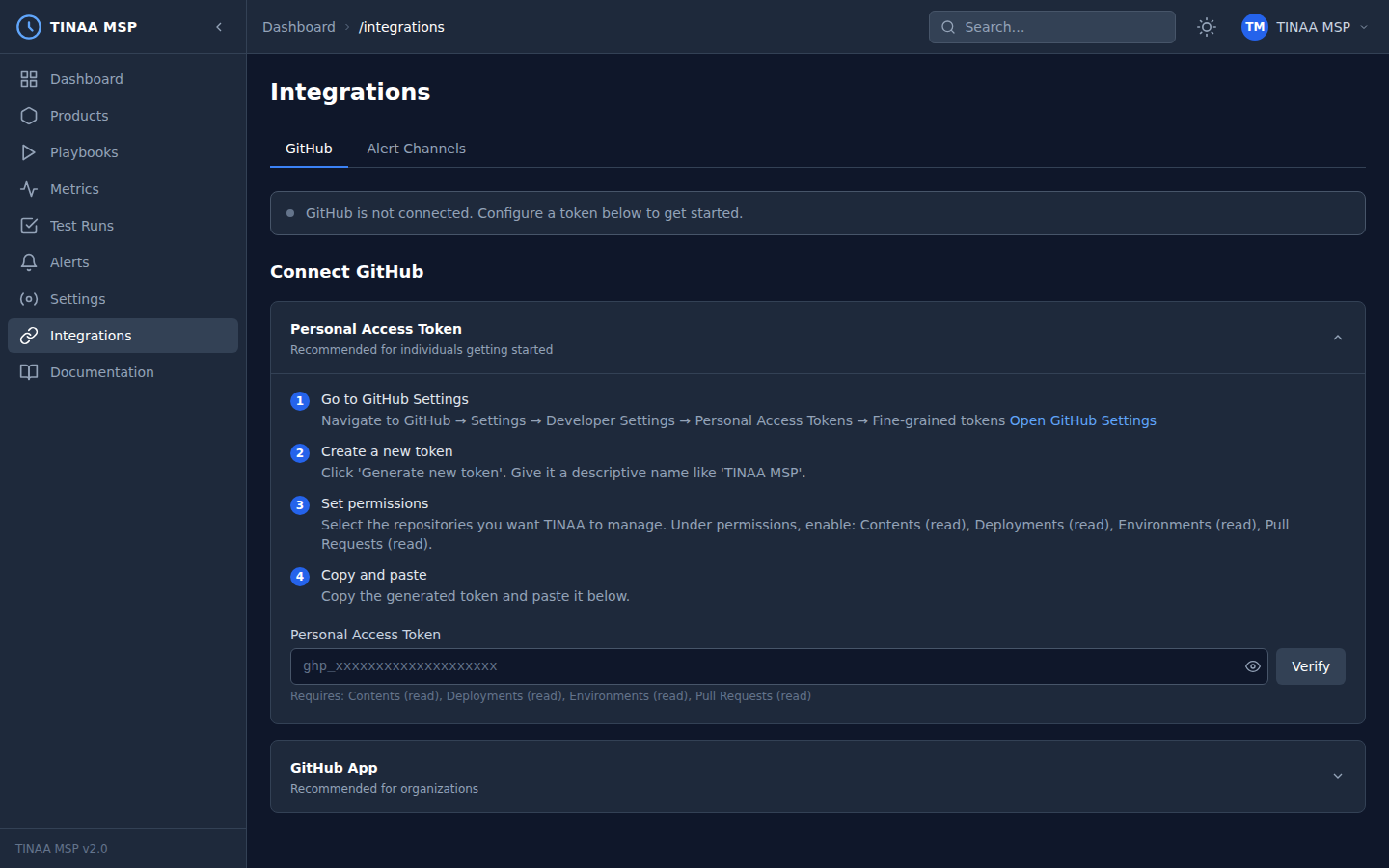
Step-by-Step Setup
- Go to github.com/settings/tokens
- Click Generate new token > Fine-grained personal access token (recommended) or Classic
- Set the expiration (90 days recommended; set a calendar reminder to rotate)
- For fine-grained tokens, select the repositories TINAA should access under Repository access
- Under Repository permissions, enable the permissions in the table above
- Click Generate token and copy the value immediately
Configure in TINAA
Navigate to Settings > Integrations > GitHub and enter the token, or use the API:
1
2
3
4
5
6
7
POST /api/v1/integrations/github/pat
Content-Type: application/json
X-API-Key: <your-api-key>

{
  "token": "github_pat_..."
}
TINAA validates the token by making a test API call to GET /user. If validation succeeds, the integration status changes to Connected.
Method 2: GitHub App
GitHub Apps are the recommended approach for organisations. They authenticate as the app itself (not an individual user), have narrowly scoped permissions, and support webhook events out of the box.
Step 1: Register a New GitHub App
- Go to github.com/settings/apps (personal) or github.com/organizations/ORG/settings/apps (organisation)
- Click New GitHub App
- Fill in:
- App name:
TINAA MSP(or your preferred name) - Homepage URL: your TINAA instance URL, e.g.
https://tinaa.mycompany.com - Webhook URL:
https://tinaa.mycompany.com/api/v1/webhooks/github - Webhook secret: generate a random secret and keep a copy
- App name:
- Under Repository permissions, enable:
- Checks: Read and write
- Contents: Read-only
- Deployments: Read-only
- Environments: Read-only
- Issues: Read and write
- Pull requests: Read and write
- Under Subscribe to events, enable:
check_rundeployment_statuspull_requestpush
- Click Create GitHub App
Step 2: Generate a Private Key
On the app settings page, scroll to Private keys and click Generate a private key. A .pem file will download. Keep this file secure — it grants full access to the app.
Step 3: Install the App
- On the app page, click Install App
- Choose your organisation or personal account
- Select All repositories or choose specific repositories
- Click Install
Note the Installation ID from the URL after installation (e.g. https://github.com/settings/installations/12345678).
Step 4: Configure in TINAA
Navigate to Settings > Integrations > GitHub App, or use the API:
1
2
3
4
5
6
7
8
9
POST /api/v1/integrations/github/app
Content-Type: application/json
X-API-Key: <your-api-key>

{
  "app_id": "123456",
  "private_key": "-----BEGIN RSA PRIVATE KEY-----\n...\n-----END RSA PRIVATE KEY-----",
  "webhook_secret": "your-webhook-secret"
}
Or configure via environment variables (see Configuration Reference):
1
2
3
TINAA_GITHUB_APP_ID=123456
TINAA_GITHUB_PRIVATE_KEY=$(cat /path/to/private-key.pem)
TINAA_GITHUB_WEBHOOK_SECRET=your-webhook-secret
Features Once Connected
Check Runs on Pull Requests
For every PR opened or updated against a monitored product’s repository, TINAA:
- Detects the PR event via webhook
- Runs the product’s smoke test suite against the PR’s preview URL (if available) or the staging environment
- Posts a GitHub Check Run with:
- Pass/fail status
- Number of tests passed and failed
- Quality score delta (before vs. after)
- Performance impact (LCP, response time changes)
- Link to the full report in the TINAA dashboard
The check run appears in the Checks tab of the PR and blocks merging if the quality gate is configured to do so.
PR Comments with Test Suggestions
When a PR modifies files in your repository, TINAA analyses which user journeys are affected and posts a comment suggesting which playbooks to run:
1
2
3
4
5
6
7
8
## TINAA Test Suggestions

Changes detected in src/checkout.py, src/cart.py

Recommended playbooks:
- checkout-regression (HIGH) — checkout journey directly affected
- smoke-test (HIGH) — always run after any change
- accessibility-audit (MEDIUM) — UI components modified
Disable PR comments per-product in Settings > Products > [product] > GitHub.
Deployment Tracking
TINAA listens for deployment_status events with state: success and:
- Records the deployment URL and commit SHA
- Runs the post-deployment test suite
- Computes the quality score delta (pre- vs. post-deploy)
- Stores the deployment record linked to the product and environment
View deployment history in the product detail page under the Deployments tab, or via:
1
GET /api/v1/products/{product_id}/deployments
Preview URL Discovery
TINAA parses deployment_status webhook payloads to extract preview URLs from common deployment platforms:
| Platform | URL extraction method |
|---|---|
| Vercel | deployment_url field in the webhook payload |
| Netlify | target_url field in the deployment |
| Render | payload.deployment.url field |
| Other | Falls back to the deployment environment URL |
Discovered preview URLs are registered as temporary preview environments in TINAA and have the smoke test suite run against them automatically.
Issue Creation for Regressions
When a quality regression exceeds the configured threshold, TINAA creates a GitHub issue:
1
2
3
4
5
6
7
8
9
10
11
12
13
14
15
16
## [TINAA] Quality regression detected: checkout-service

**Severity**: Warning
**Product**: Checkout Service
**Environment**: Production
**Score**: 87 → 74 (−13 points)

### Components affected
- Performance: 84 → 61 (LCP increased from 2.1s to 3.8s on /checkout)
- Test Health: 91 → 88 (2 tests now failing)

### Failing tests
- checkout-regression: assert_url failed on /order-confirmation
- smoke-test: assert_visible failed on .nav-menu

[View full report in TINAA](https://tinaa.mycompany.com/products/checkout-service)
Webhook Configuration
TINAA processes the following GitHub webhook event types:
| Event | What TINAA does |
|---|---|
pull_request (opened, synchronize) |
Triggers check run and test suggestions |
deployment_status (success) |
Records deployment, runs post-deploy tests, discovers preview URL |
push (to default branch) |
Updates codebase analysis, refreshes endpoint discovery |
check_run (rerequested) |
Re-runs the TINAA check on demand |
Verifying Webhook Delivery
In your GitHub App or repository settings, go to Webhooks and click Recent deliveries to see the full payload and response for each delivery.
If webhook deliveries are failing:
- Confirm the webhook URL is publicly accessible from GitHub’s IP ranges
- Check the
X-Hub-Signature-256header matches your configured webhook secret - Review TINAA logs at
GET /api/v1/healthor indocker compose logs tinaa
Testing the Integration
Once configured, verify the integration is working:
1
2
# Check integration status
GET /api/v1/integrations/github/status
Expected response:
1
2
3
4
5
6
7
{
  "connected": true,
  "method": "app",
  "app_id": "123456",
  "installation_count": 2,
  "last_event_at": "2026-03-23T09:45:00Z"
}
Next Steps
- Playbooks — configure
on_pr: trueto run playbooks automatically on pull requests - Quality Scores — understand deployment gate configuration
- Configuration Reference — all GitHub-related environment variables
- Alerts — get notified when regressions are detected