Arc Raiders Graphics Settings Optimizer - Free Config Tuner
Optimize DLSS, FSR, Ray Tracing & More - Dominate the Battlefield
Free, open-source graphics configuration tool for Arc Raiders. Easily optimize DLSS, FSR, XeSS upscaling, Frame Generation, Ray Tracing, NVIDIA Reflex, AMD Anti-Lag, and competitive settings. Features automatic backups, preset profiles, and full Steam Deck support. Whether you're maximizing FPS for competitive play or enhancing visual quality for streaming, this tool provides complete control over your Arc Raiders graphics settings.
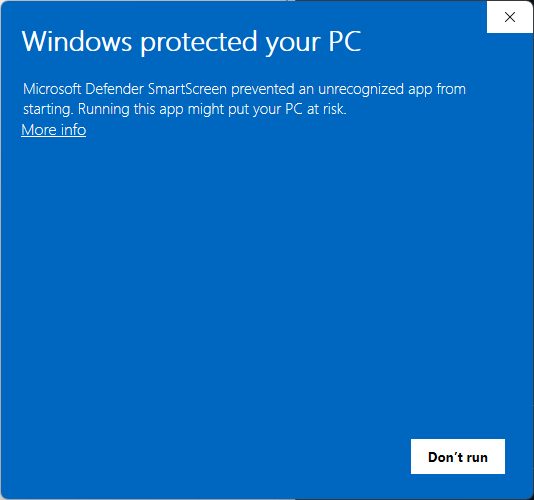
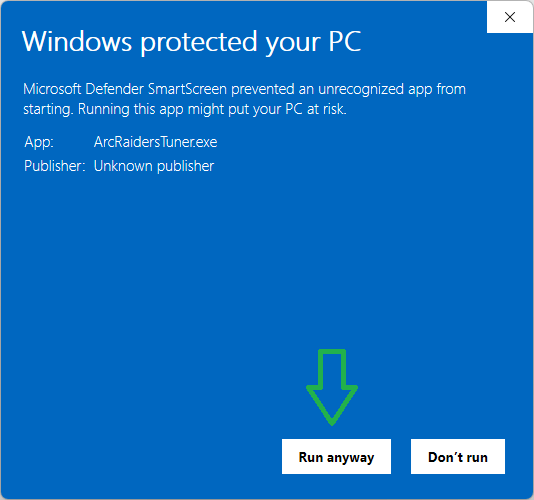
Note: Windows SmartScreen may show a warning when running the executable. This is normal for unsigned applications. Click "More info" then "Run anyway" to proceed.
Key Features - Arc Raiders Graphics Optimizer
Easy Graphics Settings Editor
Intuitive interface for adjusting Arc Raiders graphics settings including DLSS, FSR, XeSS, Ray Tracing, and NVIDIA Reflex. Real-time performance impact indicators show exactly how each change affects your FPS.
Automatic Config Backups
Your original Arc Raiders config is automatically backed up before every save. Safely experiment with DLSS, FSR, and Ray Tracing settings knowing you can restore anytime with one click if something goes wrong.
Multiple Graphics Profiles
Create and save unlimited Arc Raiders configuration profiles. Instantly switch between streaming (high quality), competitive (max FPS), and casual gaming setups. Perfect for different gameplay scenarios.
Built-in Optimization Presets
Start with expertly crafted Arc Raiders presets: Competitive (max FPS with optimized DLSS/FSR), Balanced (great visuals + performance), Quality (beautiful Ray Tracing graphics), and Cinematic (ultra settings for screenshots).
Cross-Platform Support
Works on Windows 10/11, SteamOS (Steam Deck Verified!), and Linux with Steam/Proton. Automatic Arc Raiders config detection across all platforms. Optimize DLSS and FSR settings whether gaming on desktop or handheld.
Zero Dependencies - Portable App
Single executable file for Windows, no installation required. No .NET, no runtime dependencies, no bloat. Just download the Arc Raiders Config Tuner and run - it's that simple.
Open Source & Free
MIT licensed and completely open source Arc Raiders optimizer. Review the code on GitHub, contribute improvements, or fork for your own gaming projects. 100% free forever.
Arc Raiders Config Tuner Interface
Clean, intuitive interface with organized tabs for all your Arc Raiders graphics settings. Each setting displays real-time performance impact indicators, making it easy to optimize DLSS, FSR, Ray Tracing, and other graphics options for your specific hardware.
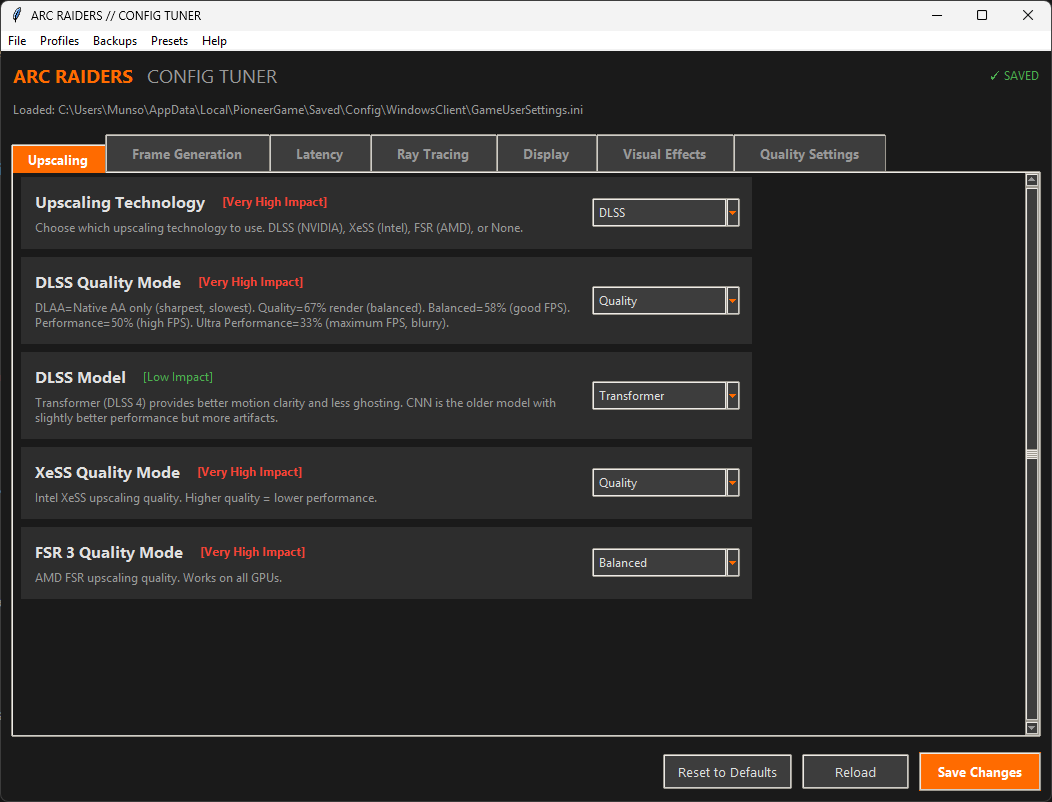
Dark theme with Arc Raiders branding • Tabbed interface • Performance impact indicators • One-click presets
Supported Arc Raiders Graphics Settings
Upscaling Technologies
- NVIDIA DLSS (Deep Learning Super Sampling)
- Intel XeSS (Xe Super Sampling)
- AMD FSR (FidelityFX Super Resolution)
Frame Generation
- DLSS Frame Generation
- FSR Frame Generation
Latency Reduction
- NVIDIA Reflex (Off, On, On + Boost)
- AMD Anti-Lag / Anti-Lag 2
Ray Tracing
- Ray Traced Reflections
- Ray Traced Shadows
- Ray Traced Ambient Occlusion
- Ray Traced Global Illumination
Display Settings
- Resolution
- Display Mode (Fullscreen, Windowed, Borderless)
- VSync
- Frame Rate Limit
Quality Settings
- View Distance
- Anti-Aliasing
- Post Processing
- Shadows Quality
- Texture Quality
- Effects Quality
Advanced Competitive Settings for Arc Raiders
Advanced Users Only: These hidden settings provide fine-grained control for competitive players. Some settings are experimental and may cause instability. Test thoroughly before ranked play.
Mouse & Input
- Mouse Smoothing - Disable for responsive aim
- Mouse Acceleration - Disable for consistent muscle memory
Visual Clarity
- Depth of Field - Off for full visibility
- Bloom & Lens Flare - Off to see enemies clearly
- Chromatic Aberration - Off for clean edges
- Vignette - Off for full peripheral vision
Performance
- One Frame Thread Lag - Reduce input lag (experimental)
- Shader Precompilation - Reduce in-game stuttering
- Texture Pool Size - Match to your VRAM
Audio
- Audio Quality - Epic for best positional audio
- 3D Spatialization - Better enemy footstep detection
Download Arc Raiders Config Tuner - Free Graphics Optimizer
Download the latest version of Arc Raiders Config Tuner and start optimizing your graphics settings today. Free, open-source, and works on Windows, Steam Deck, and Linux.
System Requirements
- Operating System: Windows 10/11, SteamOS (Steam Deck), or Linux with Steam/Proton
- For Windows Executable: No additional requirements
- For Source Code: Python 3.8 or higher
- For SteamOS/Linux: python3-tk package (for GUI support)
Steam Deck Verified - Optimize Arc Raiders on SteamOS
Arc Raiders is Steam Deck Verified, and the Arc Raiders Config Tuner provides full support for SteamOS and Steam Deck! The tuner automatically detects your Steam/Proton config location, making it easy to optimize DLSS, FSR, and graphics settings for the perfect handheld gaming experience.
Running on SteamOS
-
Switch to Desktop Mode
Press the Steam button, select Power, then "Switch to Desktop" -
Install GUI Support (one-time setup)
Open Konsole and run:
sudo steamos-readonly disable
sudo pacman -S python python-pip python-tkinter
sudo steamos-readonly enable -
Download and Run
Download the source from GitHub, extract it, and run:
python arc_tuner.py -
Auto-Detection Magic
The tuner automatically finds your config at:
~/.steam/steam/steamapps/compatdata/.../pfx/drive_c/users/steamuser/AppData/Local/PioneerGame/
Linux Users: The tuner also works on desktop Linux with Steam/Proton! The same automatic config detection applies to any Linux system running Arc Raiders through Steam.
Frequently Asked Questions
What graphics settings can I configure with Arc Raiders Config Tuner?
You can configure all major Arc Raiders graphics settings including DLSS, FSR, XeSS upscaling, Frame Generation (DLSS and FSR), Ray Tracing (reflections, shadows, AO, GI), NVIDIA Reflex, AMD Anti-Lag, view distance, anti-aliasing, post processing, texture quality, and advanced competitive settings for input and visual clarity.
Does Arc Raiders Config Tuner work on Steam Deck?
Yes! Arc Raiders is Steam Deck Verified, and the Config Tuner fully supports SteamOS and Steam Deck. It automatically detects your Steam/Proton config location, making it easy to optimize DLSS, FSR, and other graphics settings for handheld gaming.
Is the Arc Raiders Config Tuner safe to use?
Absolutely. The tool automatically backs up your original config before making any changes. All changes are reversible with one click. The application is 100% open source on GitHub, so you can review the code yourself for complete transparency.
Do I need to install anything to use Arc Raiders Config Tuner?
No installation required! The Windows version is a single portable executable with zero dependencies. Just download and run. For SteamOS/Linux, you only need Python 3.8+ and python-tkinter (which are standard on most systems).
Windows SmartScreen Warning
When you first run the app, Windows will show a SmartScreen warning. This is normal for open-source software that isn't signed with an expensive commercial certificate. The app is completely safe — you can review the full source code on GitHub.
Click "More info"
When you see "Windows protected your PC", click the "More info" link.
Click "Run anyway"
After clicking "More info", the "Run anyway" button will appear. Click it to launch the app.
Why does this happen? Code signing certificates cost $200-700/year. As an open-source project, we rely on transparency instead — the complete source code is available for anyone to review and verify.